
See what each website did with your opt-out signal.
Global Privacy Control (GPC) is a signal sent by your browser that tells a website not to sell or share your data. Today you enable the signal and hope for the best. GPC Inspector provides transparency on what the website actually did: what was sent, what the site published about its support, which scripts read the signal, what the site's consent strings recorded, and which advertising or analytics companies set cookies anyway. Facts, and nothing leaves your device. The code is open source, so anyone can check that.
Get it for Chrome Also for Brave and Edge. Free, open source.
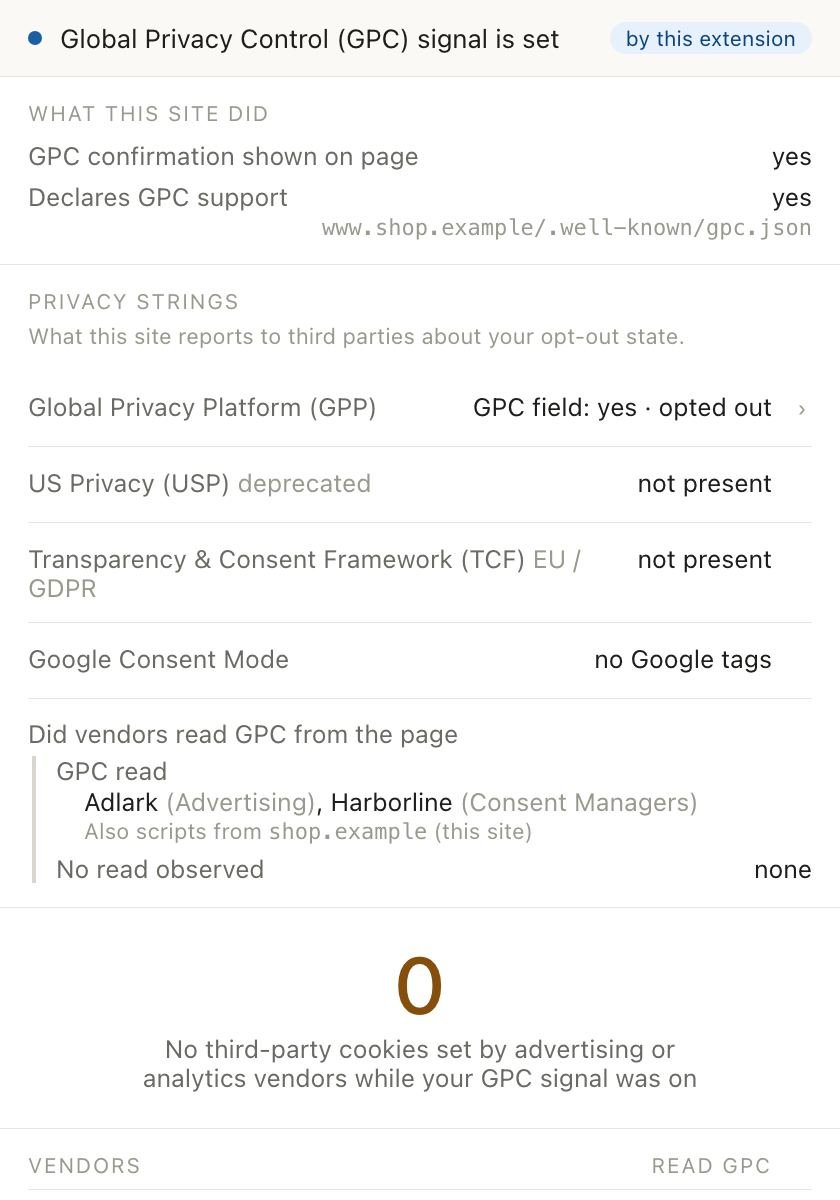
What it shows
- Whether the signal was sent, and by whom. This extension, the browser, or another extension. If nothing else sends it, GPC Inspector does.
- What this site did. Which scripts read the signal, named by company and category; whether the site publishes a GPC support file at
/.well-known/gpc.json; whether a confirmation appeared on the page. - What the site's consent strings say. The GPP, US Privacy and TCF strings that sites hand to their vendors, decoded, and whether they record your choice.
- Who set cookies while the signal was on. Every advertising or analytics company that set a cookie, by name and category, with the request that carried it. Categories and company names are Disconnect's, not ours.
- Tag containers. Which Google Tag Manager containers ran, and what consent state they carried.
- A record of what happened. Export a summary or the full log of what happened, with timestamps. Cookie values are masked by default.
What it does not do
- No scores, no verdicts, just facts. It reports what happened on the website. Whether the site is compliant is up to lawyers and regulators.
- No blocking. Blocking a request destroys the log of what the site would have done. Use a blocker alongside it if you want one.
- No data collection. Everything it observes stays in your browser. Its one network request of its own fetches the site's
gpc.json, and you can turn that off in Settings.
What it cannot see
The honest list is long, and it is published in full. The ones that matter most when reading a result:
- Requests made outside the tab: service workers, prefetches, other tabs. A vendor contacted only that way is not listed.
- Whether a vendor acted on the signal after reading it. We see the read, not what followed on the vendor's servers.
- Tags that run server-side, and a vendor behind the site's own domain name. Neither looks like a third party from the browser.
Why it asks to read every page
The extension has to read the page you are on to list the cookies and requests, which is what the "read and change all your data on all websites" permission means. The store listing's privacy declaration says it does not collect or use your data; that is true today, and we commit to keeping it that way. The extension changes the page in a few ways to enable GPC and determine what happened on the page:
- Sends the GPC signal by adding the
Sec-GPCheader and setsnavigator.globalPrivacyControlto match. - Determines who requested privacy signals by wrapping the relevant JavaScript calls for
navigator.globalPrivacyControl, cookies, and other privacy APIs. The values returned by those calls are unchanged.
Source, security, licensing
The code is open source under GPL-3.0 at github.com/gpc-inspector/gpc-inspector-extension. Security reports: SECURITY.md. Each store release is tagged in the repository so a build can be compared with the store package. The company names and categories are derived from Disconnect's list, under CC BY-NC-SA 4.0; the functional cookie names come from the Open Cookie Database, under Apache-2.0.
Get it for Chrome Also for Brave and Edge.